Useful information — but you still have to decide whether $186 today is too much, too soon.
The problem with monthly budgets
A monthly number does not answer a Tuesday question.
Your grocery budget might be $1,000 a month. Great. But now it is Tuesday, you are standing at Costco with $186 in your cart, and you need one answer:
Can I afford this without getting off track?
That is the question My Money Train is built to answer. It turns a monthly target into a live spending balance that changes with time and with every purchase.
Grocery Train
Monthly pace$1,000
Available right now$437.82
Costco cart−$186.00
After purchase$251.82
Yes — this fits your pace.
You still have breathing room, and your balance keeps rebuilding after you leave the store.
Your number already reflects the pace you chose, what you spent, and the progress you carried forward.
How it works
Set your pace once.
Know your number every day.
You are not constantly rebuilding a budget. You choose a reasonable spending pace, then My Money Train does the day-to-day math for you.
1
Choose a spending pace
Decide what feels reasonable for groceries, dining, clothes, hobbies, family spending, or anything else you want to keep under control.
2
Watch money become available
Your target is converted into a continuous pace. Your available amount builds all day — not just when a new week or month starts.
3
Spend from the number you have now
Purchases lower the balance. Time builds it back. If you spend less than your pace, the extra stays with you instead of disappearing at month-end.
Give your budget killers their own train.
You do not need fifty categories. Track the few things that quietly wreck the plan when they get away from you.
Groceries
Dining out
Clothes
Entertainment
Kids
Travel
Fun money
You should not need a spreadsheet to know how you are doing.
The train is the shortcut. Build a cushion and it levels up. Fall too far behind your spending pace and it starts to struggle. The visual tells you what the numbers mean before you even study them.
 Way behindStop spending and let the train recover.
 RecoveringYou are closing the gap.
 On trackYour pace and spending are lining up.
 AheadYou have real breathing room.
 Way aheadYour cushion has momentum.
See how it works
My Money Train, explained.
See how your spending money builds with time, how purchases change your available balance, and how your train makes it obvious when you are ahead — or when it is time to slow down.
The real app
Your spending pace, made obvious.
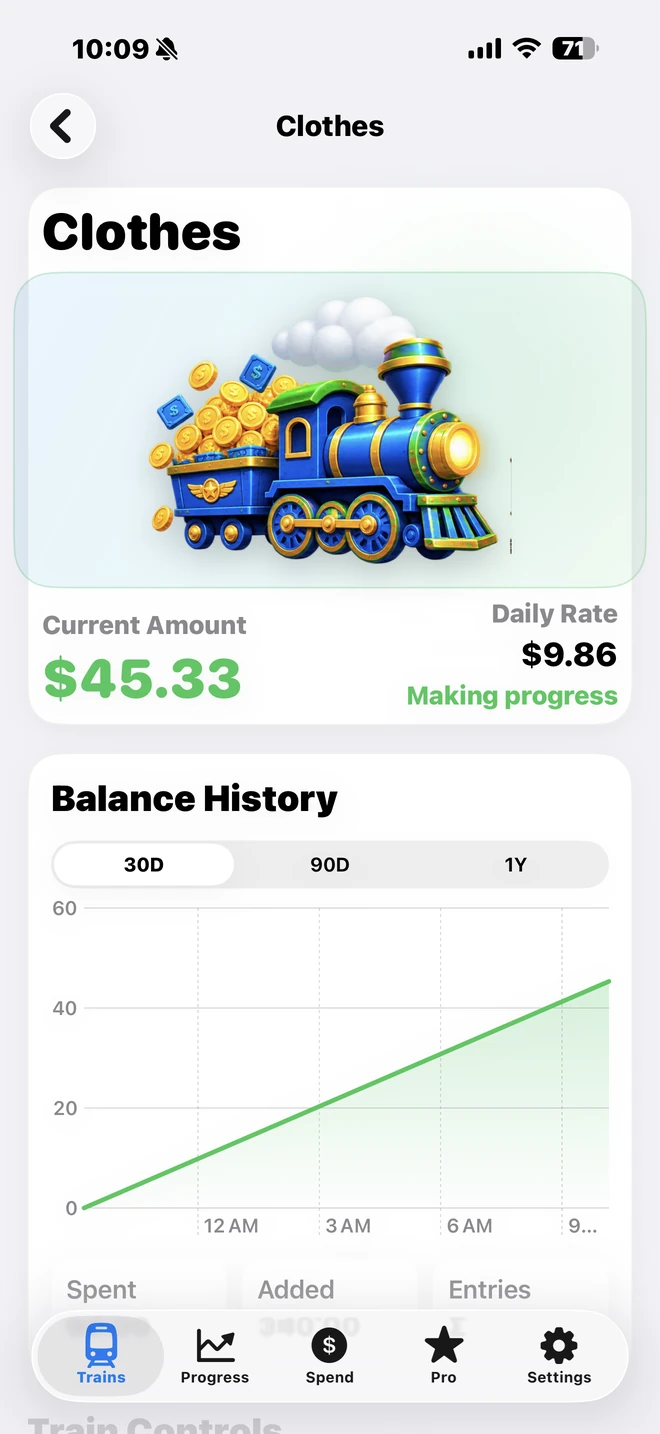
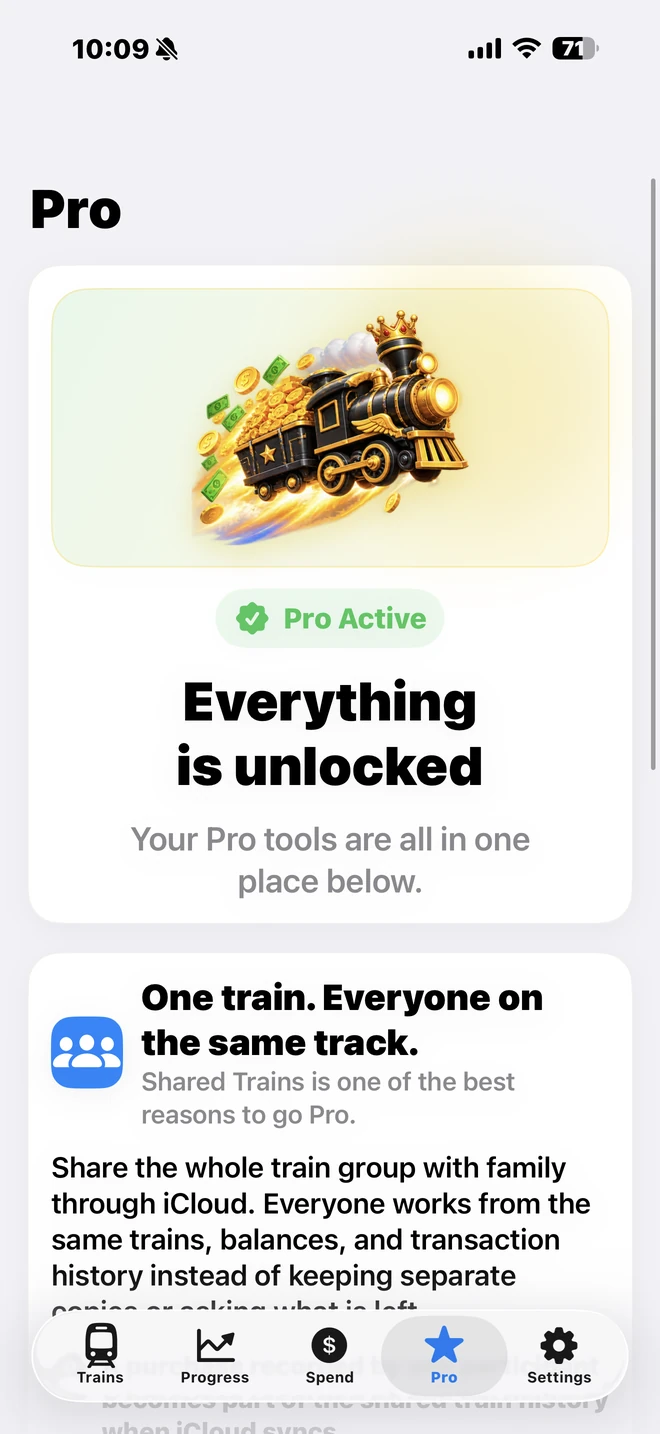
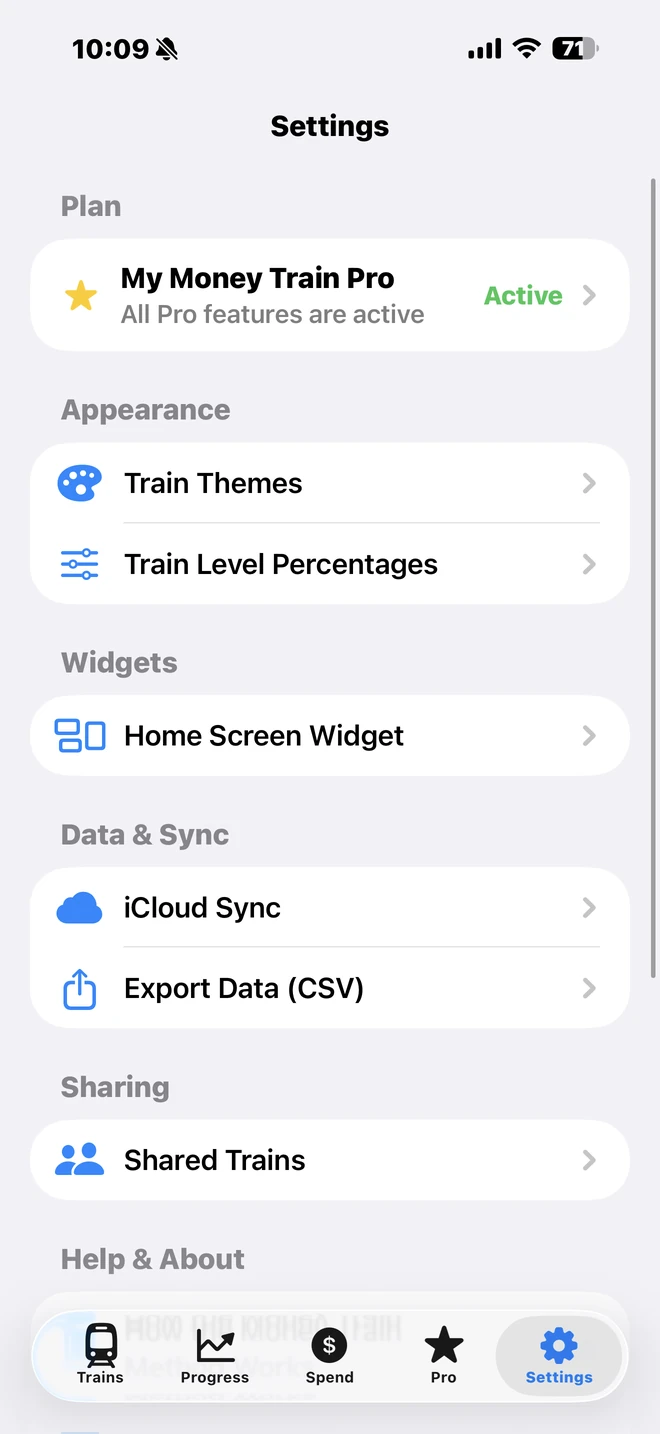
These are actual My Money Train screens. See your trains, check how far ahead or behind you are, record spending in seconds, and keep the same answer close by with the Home Screen widget.
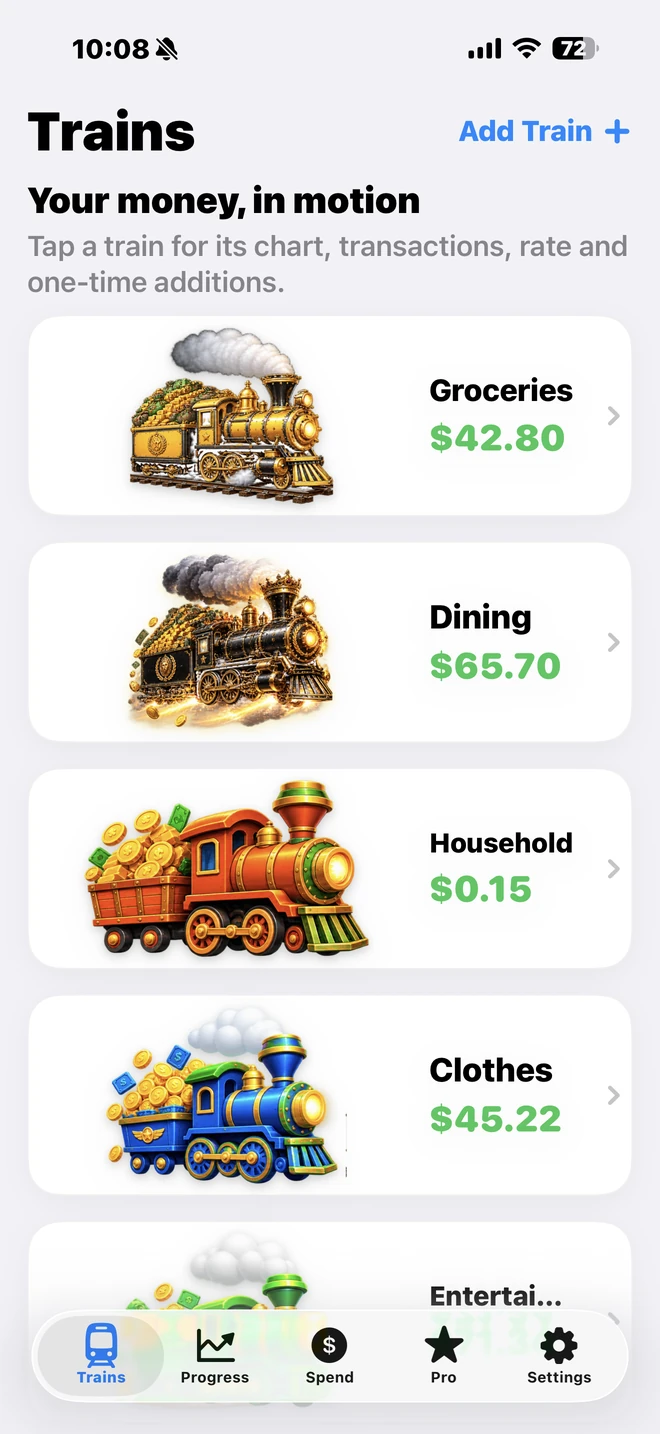
See what is available nowEach train has one live amount that changes as time passes and as you spend.
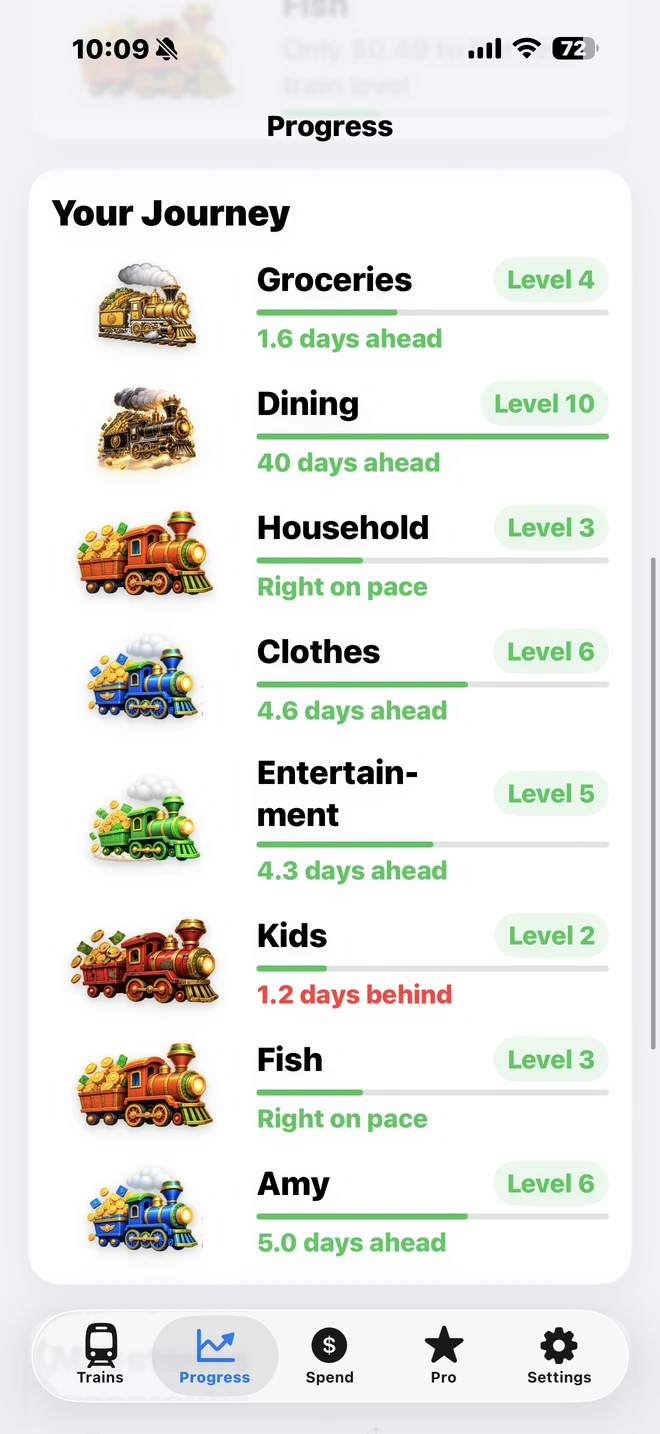
Know whether you are aheadDays ahead, days behind, and train levels turn the math into something you can understand at a glance.
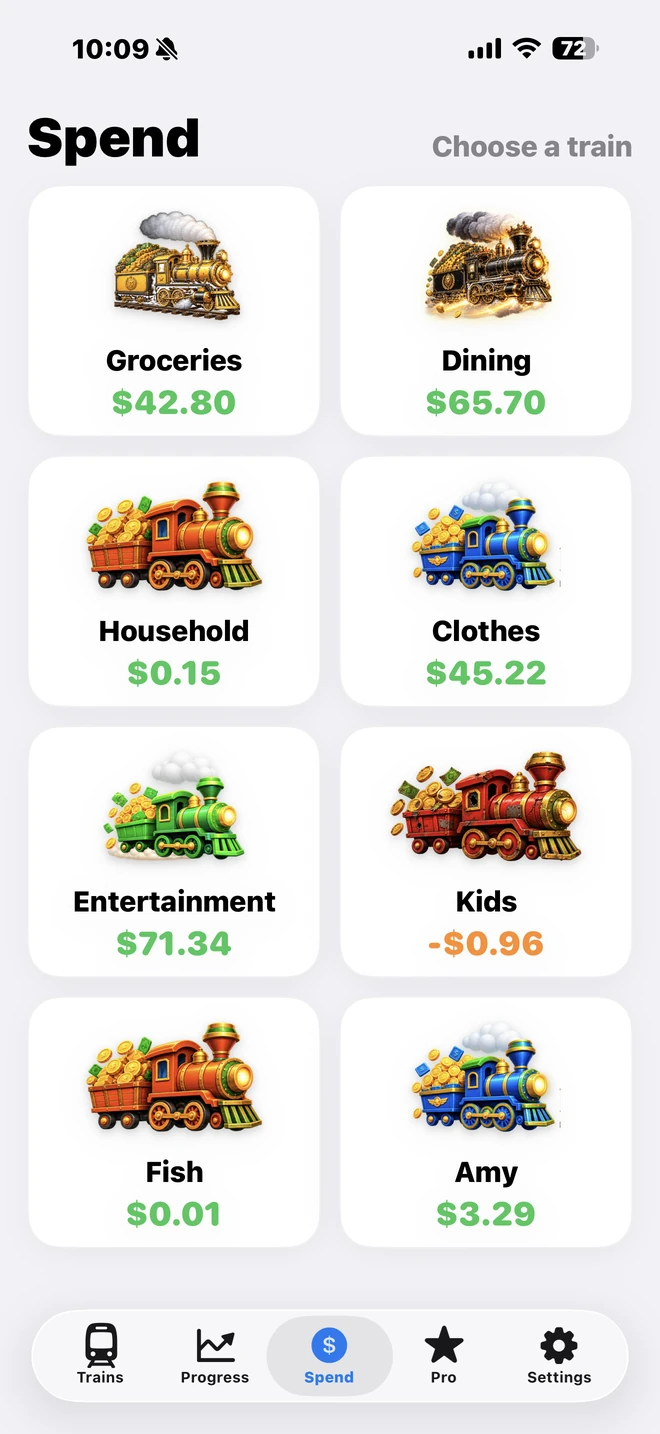
Record spending fastChoose a train, enter the purchase, and immediately see what is left.
Built for daily use
Details when you want them. Simplicity when you do not.
Open a train for balance history and pace details, unlock household and customization tools with Pro, or manage iCloud sync, sharing, widgets, and exports from Settings.
At a glance
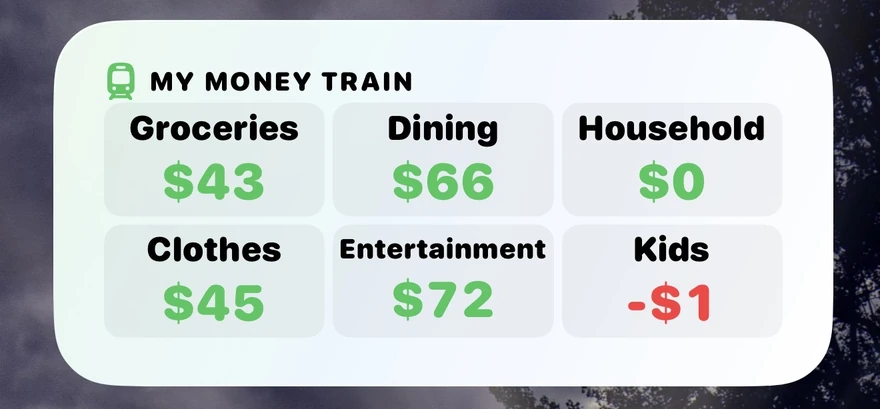
Your trains can live on the Home Screen.
Check the balances you care about without opening the app. The widget keeps everyday spending visible so the plan stays easy to follow.
Available now on the Apple App Store
Start your first Money Train today.
My Money Train is now available to download on iPhone. Start free, set a spending pace, and see what you can actually spend right now.
Free to start
Pro $9.99/year
Lifetime $29.99
WHY YOU'LL WANT IT
Know before you spend
Open the app and get a clear answer without doing budget math in your head.
Keep the progress you earn
Spend less than your pace and the extra carries forward instead of disappearing at month-end.
Recover without starting over
Overspend? See the gap, slow down, and watch your spending room rebuild with time.
One glance. One answer. Less second-guessing.
Why people use it
Less guessing.
Less guilt. More control.
The point is not to make every purchase feel like a mistake. The point is to know when spending is fine — and to notice early when it is not.
If you are a spender
You get a clear boundary without feeling like the answer is always “no.” If the money is there and your train is ahead, you can spend it with confidence.
If you are a saver
You can see that the plan is still intact without mentally recalculating every purchase. The cushion is visible, measurable, and carried forward.
🛒
Know before you buy
See what is actually available today instead of trying to guess from a month-long total.
💰
Keep the progress you earned
Spend less now and the extra stays available later. A calendar change does not wipe out a good streak.
🚂
See trouble early
Your train starts showing the strain before a whole month is blown, giving you time to slow down and recover.
🛤️
Recover without “starting over”
If you overspend, time keeps rebuilding the balance. You can see the path back instead of declaring the month ruined.
👥
Share the same trains with Pro
Keep your personal trains, add shared trains for spending you manage together, and see the same live balances on both devices.
🎯
Focus only where it matters
Create trains for the spending areas that actually need attention and ignore the rest.
“$42 spent. Your train is still 2 days ahead. Enjoy it.”
★★★★★
“I love being able to look at one number and know where I stand. It makes spending decisions feel simple instead of stressful.”
SharleneEarly feedback
Simple pricing
Try the method free.
Go Pro when you want more.
The free version gives you the core idea: live spending trains that show whether you are ahead or behind. Pro is for people who want more trains, sharing, customization, and deeper control.
Free
Everything you need to see if the method works for you.
$0
- Up to 3 trains
- Default train theme
- Transaction history
- 30D / 90D / 1Y reports
- Core widget
- Apple Shortcuts
Pro
More trains, more control, and household features.
$9.99/yr or $29.99 lifetime
- Unlimited trains
- Share trains with a partner or household
- Additional visual themes
- Custom train-level thresholds
- Full widget configuration
- CSV export
Available now on the Apple App Store. Localized pricing may vary.
The idea, explained simply
What is a Money Train?
No. A monthly budget tells you a total for a block of time. My Money Train turns that target into a live pace and shows what is available right now. The number keeps changing as time passes and as you spend.
It is the spending room you have built based on the pace you chose, minus what you have already spent. It is meant to answer the practical question: how much room do I have right now?
No. Your progress carries forward. If you spend less than your pace, the cushion you built stays with you instead of disappearing because the calendar changed.
Your train falls behind and visually starts to struggle. As time passes without more spending, the balance rebuilds and the train recovers. You can see your way back instead of starting a new month from zero.
Start with the spending that tends to surprise you or cause arguments with the budget: groceries, restaurants, clothes, hobbies, kids, entertainment, travel, or everyday discretionary spending.
The free version includes up to 3 trains. Pro unlocks unlimited trains, along with sharing, additional themes, custom train-level thresholds, full widget configuration, and CSV export.
Yes. Sharing is a Pro feature. You can invite someone to a shared set of trains so both of you can follow the same live balances and record purchases against the spending you manage together.
No. Their own trains stay in place. The shared trains appear alongside their personal trains, so they can use both.
The owner controls the shared train setup and manages who has access. People who have access can use the shared trains and record purchases, while the owner remains in control of the shared set.
Changes save on each device and then sync through iCloud. Most updates appear quickly, although iOS controls the exact sync timing. If one phone looks behind, open My Money Train and give iCloud a moment to catch up.
Yes. Both people can record separate purchases normally. To avoid conflicts, do not edit the exact same transaction on two devices at the same time.
Yes. When you are using shared trains, you can choose widget trains from both your own trains and the shared set, with up to 6 trains shown in the configured widget selection.
Not at the same time. If you are currently using a budget shared with you, leave the shared budget first before sharing your own set.
No. Pro is available as a $9.99 yearly option or a $29.99 lifetime purchase. App Store localized pricing may vary.
Available now
Stop asking, “Can I spend this?”
Know.
Download My Money Train from the Apple App Store and start with up to 3 trains free. Set your pace, record spending, and know what is available right now.